


The short answer: Microsoft's new Copilot gives businesses one app to ask questions, build small tools, and delegate work.
It also widens the data exposure that Microsoft's security tools exist to control. At Datalink Discover 2026, speakers covered both sides: what the new Copilot does, and how to protect the environment it runs in.
What is the new Copilot?
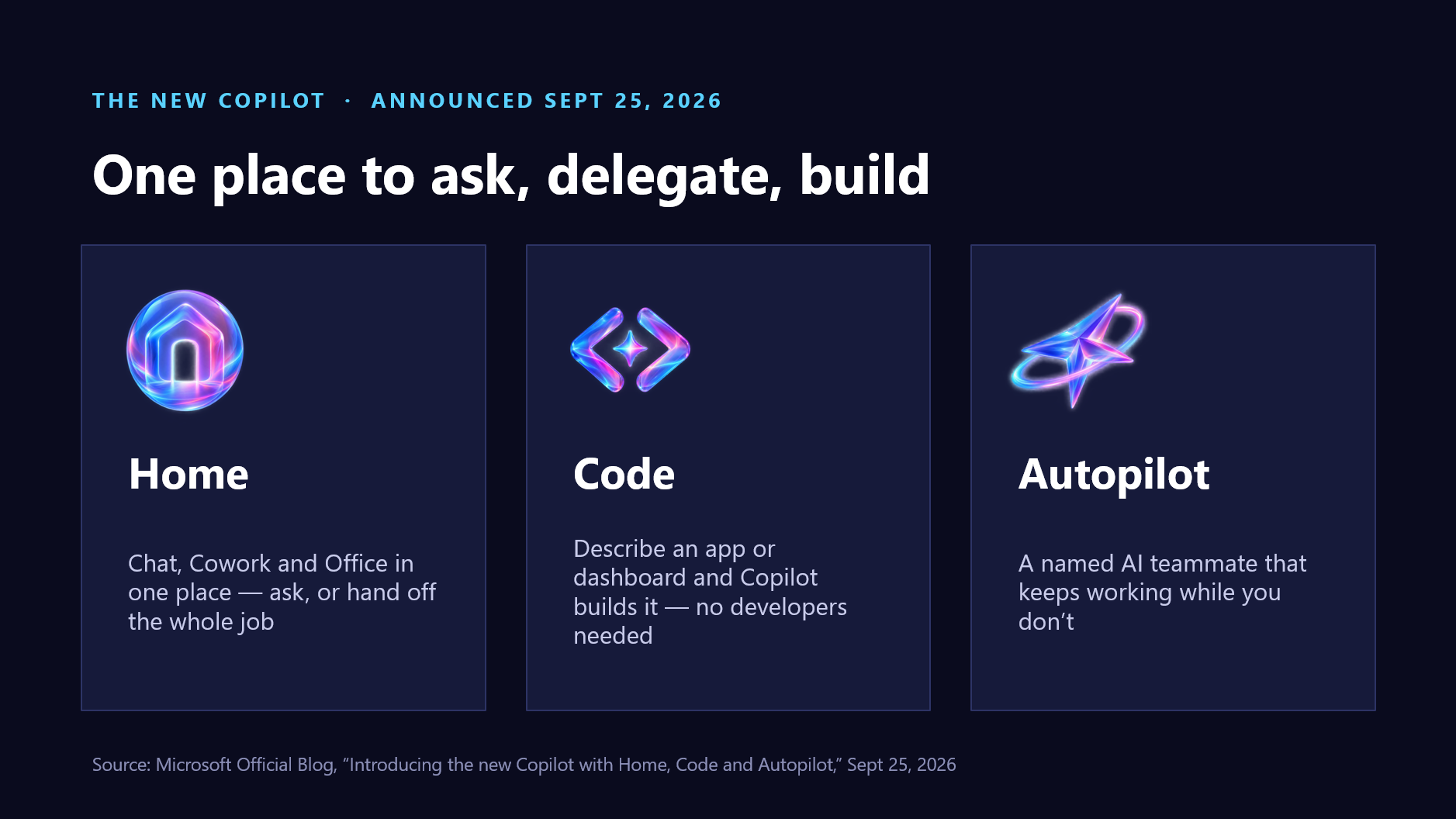
John Petersen of TD SYNNEX presented Microsoft's new Copilot, which Microsoft announced on September 25, 2026 in its official blog post, "Introducing the new Copilot with Home, Code and Autopilot." It has three parts:
-
Home: Chat, Cowork, and Office in one place. You can ask a quick question, or hand off the whole job. Copilot Cowork is generally available today.
-
Code: Describe an app, tracker, or dashboard and Copilot builds it — no coding required. Apps are sandboxed and hosted in your tenant, using the same technology as GitHub Copilot. Availability note: Code launched as a "Frontier" preview capability (preview for Microsoft 365 Premium and Pro rolling out later this year), so treat it as early‑stage rather than a finished product.
-
Autopilot: A named AI teammate with its own identity, permissions, and audit trail that runs routines on its own — describe a task once and it keeps working. In the keynote demo the presenter named theirs "Dot." Availability note: Autopilot was shown as a Frontier private preview.
Why it works for smaller businesses
Petersen's pitch was capacity without new hires, software without a developer, and follow‑through without babysitting — all on Microsoft 365, a platform many businesses already own. He explained that Work IQ grounds each answer in your email, meetings, and files — Microsoft describes it as a workplace‑intelligence layer that gives Copilot a semantic understanding of work across the business. He added that Fabric IQ brings more than 20 million Power BI semantic models into Copilot, and that GPT and Claude models are available in one place, with "Auto" choosing the right model automatically based on accuracy, speed, and cost.
One example he showed: a weekly reporting tool built with Cowork. It pulls from an individual's email, calendar, and chats, strips personal calendar events to protect privacy, and then rolls the results up for the whole team — including stats from ticketing systems — and even summarizes talking points. It's a demonstrated workflow built with Cowork, not a packaged product you buy off the shelf.
The catch: Copilot reflects your data
Copilot is only as safe as the data and permissions behind it. Amr Salah, Datalink's Director of Engineering, asked the key question: do you know where all your data lives, who can access it, and what AI can retrieve? Before AI scales, he recommended checking four things:
-
Inventory: critical repositories, owners, and data flows.
-
Access: permissions, oversharing, and external access.
-
Governance: classification, retention, and lifecycle.
-
AI readiness: use cases, controls, and adoption risks.
This mirrors Microsoft's own guidance that the most common blocker to Copilot value is permissions hygiene and oversharing in SharePoint, OneDrive, and Teams.
Datalink Networs offers a free AI & Data Governance Assessment, a focused Copilot readiness assessment that surfaces exposure and produces a prioritized roadmap to reduce rework, risk, and avoidable cost.
Securing the Microsoft environment
Kodi Oshiro (SOC Manager) and Luke Waltz (SOC Analyst I) covered the security side. Datalink's managed security is built on the Microsoft stack and layered with a 24/7 SOC:
-
Microsoft Sentinel for SIEM and SOAR.
-
The Defender suite and Microsoft Entra ID for endpoint and identity protection.
-
Azure Lighthouse for multi‑tenant management.
-
BitLocker for device encryption.
-
Automated playbooks, with weekly threat hunting, monthly reporting, and compliance dashboards.
-
Microsoft Security Copilot integration is planned as the next step.
The diagram below shows how the pieces connect: data sources feed the five Microsoft Defender products, which feed Microsoft Defender XDR, which feeds Microsoft Sentinel, all watched around the clock by Datalink's SOC via Azure Lighthouse — with an on‑premises firewall, switch, and sensor branch, and Security Copilot slated as the next layer.
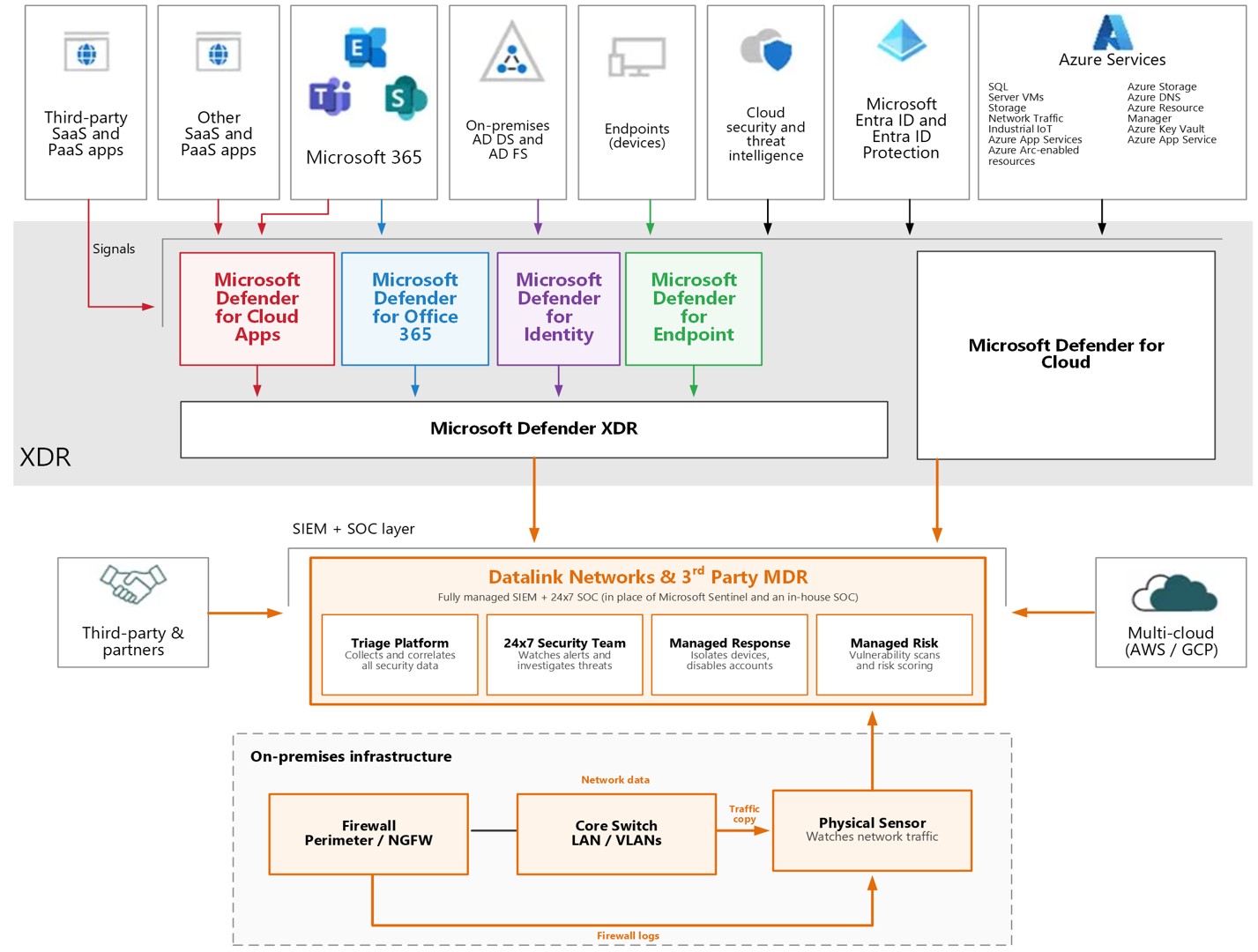
Figure 1: Datalink's Microsoft‑native managed security stack — telemetry flows from data sources through the Defender products to Defender XDR and Microsoft Sentinel, monitored 24/7 by Datalink's SOC via Azure Lighthouse, with planned Microsoft Security Copilot integration.
Frequently asked questions
What is Autopilot in Microsoft Copilot?
A named AI teammate with its own identity, permissions, and audit trail that runs routines on its own — describe a task once and it keeps working. It was presented as a Frontier private preview, so availability is early‑stage.
Does Copilot Code need developers?
No coding is required — you describe the app or dashboard and Copilot builds it in a sandbox hosted in your tenant, on the same technology as GitHub Copilot. For production use, apps run under IT governance through Copilot Managed Runtime. Code is currently a Frontier preview capability.
How do I prepare my data for Copilot?
Inventory your data, review access and oversharing, apply governance (classification, retention, labels), and assess AI readiness. Datalink's free Copilot readiness assessment covers all four.
What Microsoft tools does Datalink use for managed security?
Microsoft Sentinel (SIEM/SOAR), the Defender suite, Microsoft Entra ID, Azure Lighthouse, and BitLocker — layered with a 24/7 SOC and automated playbooks, with Microsoft Security Copilot planned next.
Plan the rollout with an Official Microsoft Solutions Partner
Copilot adoption and security belong in one plan. Datalink Networks designs, secures, and hands off Microsoft environments as one accountable partner. Start with the free AI & Data Governance Assessment, or ask about managed security.